Cezar Scan turns Android devices into private document scanners
Cezar Scan, developed by Cezar Creative, is a privacy-focused Android scanner designed to digitize paperwork quickly for business and study contexts. The app captures high-quality PDFs and JPEGs using the device camera, with automatic edge detection and intelligent cropping to reduce manual framing. It includes built-in OCR for searchable text, local-only processing to keep documents on the device, and multi-page management aimed at professionals, students, and remote workers who need portable, private document handling.
What Cezar Scan is and how it serves mobile document needs
Cezar Scan is a mobile document scanning tool that converts paper items such as receipts, notes, and contracts into digital files, using the Android camera for capture. The app's core purpose is immediate document digitization, producing high-quality PDF and JPEG outputs while keeping processing local to the device. This design addresses the common workflow of turning physical records into searchable digital archives for on-the-go professionals.
How the app structures a scanning workflow for multi-page documents
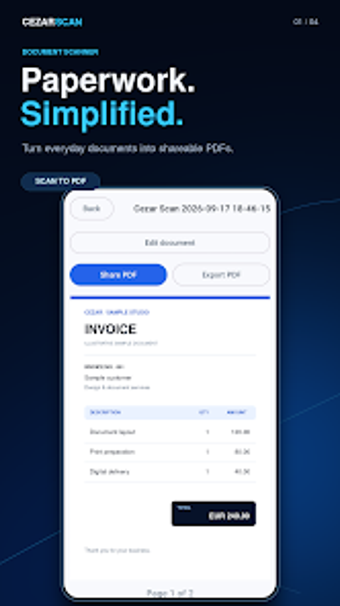
The app organizes scanning around quick capture, automatic edge detection, and multi-page assembly, which lets users scan several sheets and save them as a single PDF. Built-in OCR recognizes text so scanned pages become searchable, supporting retrieval in filing workflows. These capabilities suit tasks like submitting expense receipts, compiling meeting notes, or archiving signed pages into consolidated documents.
How approachable the interface and onboarding are for busy users
The interface offers light and dark themes and focuses on camera capture with automated cropping, reducing manual adjustments during scanning. Local processing eliminates the need to configure cloud accounts, which shortens setup for users who prioritize privacy. The app design favors direct scanning flows, making it practical for professionals who need rapid capture rather than extensive prior training.
Compatibility and reliability for sharing and storage in business contexts
Cezar Scan creates standard PDF and JPEG files, enabling use with common document workflows and external editors without conversion loss. Local-only processing keeps files on-device, which affects sharing options by requiring users to export files themselves to email or cloud storage. The app emphasizes privacy and searchability through OCR, while relying on the device for backup and external collaboration steps.
Cezar Scan suits privacy-minded professionals who need on-device scanning
Cezar Scan is a practical option for professionals and students who require portable, searchable document capture with local processing; it reduces reliance on external servers by design. A trade-off exists in that sharing and team collaboration depend on manual export, which may not fit workflows needing built-in cloud sync. For anyone prioritizing in-device privacy and fast multi-page scanning, the app performs reliably for day-to-day document digitization.